
Hardware and Operating Systems Essentials Practice Test
$69.00
- Buy to unlock unlimited access to all Quiz questions and Answers in this Quiz.
- After purchase you can print a PDF of the whole quiz at any point. The PDF will contain the questions and the correct answers.
About this Exam
Prepare to demonstrate your foundational knowledge in computing.
This practice exam and comprehensive study guide are specifically crafted for individuals embarking on their journey into the exciting world of Information Technology. It is perfectly designed for aspiring IT professionals, dedicated students, and passionate technology enthusiasts looking to build a powerful and enduring career in tech.
By completing this resource, you can confidently gauge your readiness for entry-level roles and validate your core competencies before attempting any final assessment. Think of this as your essential training ground, filled with illustrative examples and insightful summaries. Gain the essential confidence and skills needed to stand out and succeed in this dynamic and growing field!
Ready to test your knowledge?
Buy Now to Access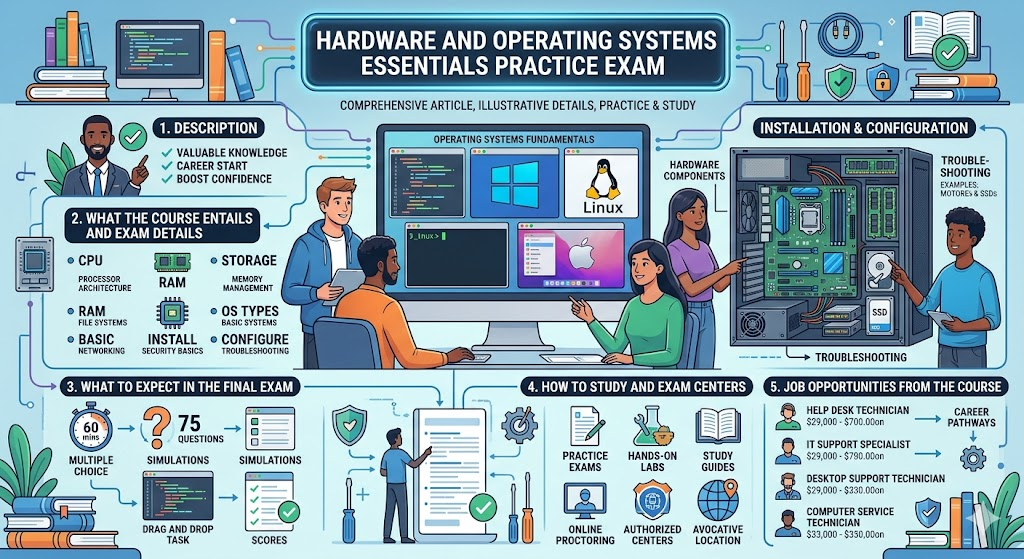
Additional Information
What the Course Entails and Exam Details
To master the Hardware and Operating Systems Essentials exam, students should possess a comprehensive understanding of the foundational components of computing. The course and practice materials provide an illustrative, yet detailed, overview of standard concepts across two primary domains:
Core Hardware Principles: This section covers standard concepts of internal computer components. Students explore standard configurations for central processing units (CPUs), various types of random access memory (RAM), diverse storage technologies (such as hard disk drives and solid-state drives), and essential motherboards. You will learn the standard illustrative methods for installing, configuring, and performing fundamental maintenance and basic troubleshooting on these vital devices.
Operating Systems (OS) Fundamentals: Gain a clear understanding of the purpose and functions of a modern OS. This part covers the standard illustrative installation, configuration, and management of various widely used systems, potentially including illustrative examples related to Windows, macOS, and Linux. Expect to be tested on typical user account management, standard file systems, basic networking configurations, foundational security settings, and illustrative common operating system troubleshooting techniques.
This practice content is illustrative and designed to represent the typical breadth and depth of a course covering this foundational knowledge.
What to Expect in the Final Exam
When you step into the real testing scenario for a Hardware and Operating Systems Essentials certification, you should expect a format designed to thoroughly assess both your theoretical understanding and, in some cases, your practical problem-solving skills. While official exam details will always vary, you should prepare for the following illustrative format:
Format: The primary question type for an entry-level fundamentals exam is almost universally multiple-choice, which may include standard, multiple-response, and scenario-based questions. Some certifications may also include illustrative practical, hands-on simulation questions, where you demonstrate specific tasks or troubleshooting skills within a simulated environment.
Questions: Prepare for approximately 60-90 illustrative questions, covering the core topics of hardware components, peripheral devices, operating system installation, configuration, networking basics, security fundamentals, and essential troubleshooting processes.
Time Limit: You will typically have a clear, set timeframe, such as 60-90 illustrative minutes, to complete the entire exam. Use your time wisely.
Passing Score: The official passing score for such exams is set by the certification provider and varies significantly, but it might fall within an illustrative range of 650-800 on a variable scale, or represent approximately 70-80% illustrative correctness. There are typically no strictly enforced official rules beyond standard test-taking protocol (e.g., no aids, no collaboration, required ID).
Always consult the definitive, up-to-date information on the official website for your chosen certification to confirm precise requirements.
How to Study and Exam Centers
Effective preparation is the key to demonstrating your competence! Maximize your chances of success by following these proven and actionable illustrative strategies:
Utilize Comprehensive Study Guides: Leverage a wide array of educational resources, including official textbooks, comprehensive study guides, and in-depth video tutorials. There are many superb courses and materials specifically tailored to the domains of computer hardware and operating systems.
Practice with Multiple Mock Exams: Practice makes perfect! Dedicate ample time to taking diverse practice tests, such as this Hardware and Operating Systems Essentials Practice Exam. Analyze all of your answers, particularly focusing on understanding the rationale behind both correct and incorrect illustrative options.
Get Hands-On (Illustrative): Theory is vital, but practical experience is invaluable! Whenever possible, engage in illustrative hands-on labs or safely experiment with your own hardware and diverse operating systems. Practical simulations provided in some training materials can also offer great practical illustrative training.
How to Take the Exam (Illustrative Info):
The actual final assessment is typically administered through well-established proctoring methods, which vary by training provider. Most often, you can select between two convenient options:
Online Proctored Exams: Many major training and certification bodies (such as CompTIA through their partnerships and portals, generic examples would be illustrative) offer a highly flexible and convenient online testing option. These proctored exams can often be scheduled through official online portals, allowing you to take the test in the comfort and privacy of your own secure, pre-approved location. A remote proctor will monitor you throughout the entire illustrative duration.
Physical Testing Centers: Alternatively, you can choose to take your exam at an authorized physical testing location, such as dedicated test centers or specific educational institutions and authorized schools. You can typically find lists of authorized physical centers globally when registering through the official exam provider's scheduling platform, like illustrative examples (e.g., specific authorized centers for the relevant certification or a generic illustrative platform).
Always check with your specific illustrative training provider for the absolute current official steps for exam registration, payment, and scheduling.
Job Opportunities from the Course
Earning a foundational certification or demonstrating deep knowledge through a thorough study of hardware and operating systems is an exceptional first step that can open numerous, exciting career doors within the vast IT industry. By preparing well and potentially earning a related certification, you unlock dynamic career paths and unlock positions like these illustrative entry-level and foundational roles:
Help Desk Technician (Tier 1): Act as the first point of contact, providing essential technical support and effective troubleshooting for basic hardware, software, network connectivity, and user account issues.
IT Support Specialist: Deliver invaluable technical assistance and expert support, including installing and configuring computers, managing essential software, and maintaining vital network systems for diverse organizations.
Desktop Support Technician: Focus on the critical day-to-day management, essential maintenance, and professional troubleshooting of a company's end-user computers, various peripheral devices, and diverse operating systems.
Computer Service Technician: Specialize in the expert physical assembly, professional repair, preventive maintenance, and expert troubleshooting of computer hardware components and systems.
Entry-Level Network Administrator (Illustrative Pathway): While further specialization is essential for advanced networking roles, a powerful foundational understanding of hardware and operating systems serves as a critical first step and a powerful illustrative pathway toward building a successful career in advanced network administration and vast system management.
Prepare diligently for your exam, and get ready to launch a truly rewarding and incredibly promising career in the ever-evolving world of technology!
Frequently Asked Questions
Reviews
5.0
Based on 0 reviews
Leave a Review
No reviews yet. Be the first to review!